Archive

Posts Tagged ‘network sniffer’

Capsa WiFi Reviewed by IT Wire

April 8th, 2011 admin No comments

Author: David M Williams

Colasoft Capsa WiFi has just released for one month, and it is now firstly reviewed by David M Williams from IT Wire, a professional editor who articularly specialises in mergers and acquisitions and enterprise applications. Let’s enjoy his review.

WiFi traffic is, by nature, more ethereal than its wired equivalent. Specialised tools are necessary to diagnose wireless network faults, and Colasoft has extended its excellent Capsa line with a new product to sniff and analyse your WiFi network.

As with other tools in Colasoft’s range, Capsa WiFi is a packet sniffer which stands out from the competition by its superb user interface. There are no cryptic or arcane command lines to worry about.

Instead, Windows-basd network administrators can interrogate and inspect raw packet data through a clean, Microsoft Office-style GUI that turns normally complex tasks into straightforward drop-down lists and menu options.

Capsa WiFi understands the gamut of 802.11 protocols and can listen in on any connectible access point that your laptop can reach. You might wish to plug into a cabled network because Capsa WiFi will disconnect you from any WiFi connections in order to do its work. However, it is capable of sniffing traffic across multiple WiFi networks provided they use the same station ID.

Network analysis, by nature, involves vast amounts of data flying by so it is essential for a tool to save data to a buffer, and to allow the user to hone in on the information that matters. Capsa WiFi provides a range of easy to use filters and rules that make this very simple, but effective.

Capsa WiFi weighs in at $USD 699.00 but the product can pay for itself when used on a network of reasonable size and complexity.

Among the many uses of a packet sniffer are to diagnose network intrusions, troubleshoot DHCP problems, analyse network utilisation, uncover reasons for slow network performance, analyse broadcast traffic, raise unattended alerts on abnormal traffic and many other things.

While other network analysis tools exist, Capsa WiFi stands out – as with the rest of the Colasoft range – by its excellent user interface and rich feature suite.

How to Detect Possible Network Loops in Network?

April 12th, 2010 Colasoft 11 comments

Do you know what a network loop is? Have you ever had a network loop in your LAN? No matter you want it or not, a network loop in the LAN can bring down your whole network.

First, let’s see what a network loop is. What does a network loop do? A network loop is a network configuration there is more than one path between two computers or devices, which causes packets to be constantly repeated. This is due to the fact that a hub will blindly transmit everything it receives to all connections – other devices, such as switches and routers, might be able to reduce or eliminate this problem.

In this article, I’m going to show you how to detect the network loops in network with Capsa network analyzer 7.1?

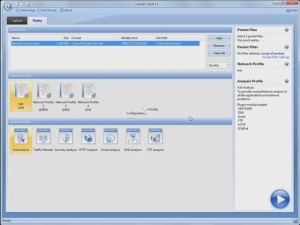
Let’s start Capsa, and then add in the packet file into the ready-to-replay list. Without any other settings, click this icon to start replay directly.
01
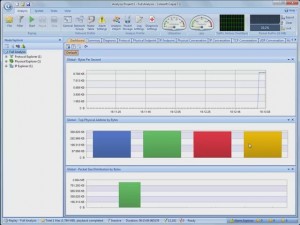
To detect network loops, first we come to the Dashboard tab. The graphs show that the traffic is not big. We can conclude that, no machine is keeping sending a large sum of packets, to block the bandwidth.
02
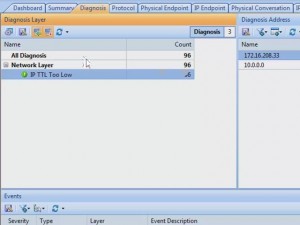
We can sure from the Protocol tab, that only ICMP is used in the traffic. However, in Diagnosis tab, there is one record, IP TTL too low, which means a packet has passed too many routers. That is a sign od network loop.
03
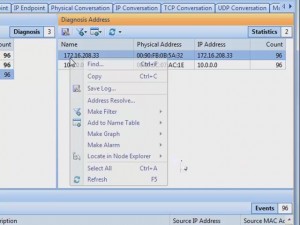
And we can see the anomaly happens at IP address, one seventy two, dot sixteen, dot two zero eight, dot thirty three. Let’s start from this address. Right-click on the address, and locate it.
04
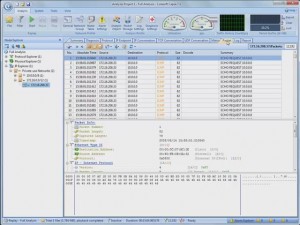
Then, go directly to the packet tab. We can see all the packets are ICMP packets. And we find the delta time between the packets is very small, and there are more than twelve thousand packets. This couldn’t be normal. Just a simple ping can’t produce so many packets, it looks like network loop a little bit.
05
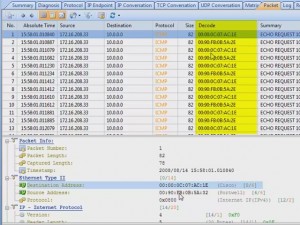
To confirm our guess, we should go down to the digits in the packets. We can compare the field information of different packets, by checking the fields in this pane. While we come to the identification field, we can see there are so many packets have the same identification number. We know that one ICMP packets has its own identification number, there’s no way that so many packets have the same number. Now we are much sure it’s a network loop. But to make sure of this, we need to see another important field, TTL value. Check the Time To Live field. We can see that the same ICMP packet loops around the router, and each time it passes the router, its TTL value is reduced by one. Until its TTL value comes to zero, it’s dropped by the router. Then another packet does it again.
06
This is the end of the story. Hope you already know how to find out network loop in network with network sniffer.
A video tutorial for troubleshooting network loops is avaliable at http://www.colasoft.com/download/arp_flood_arp_spoofing_arp_poisoning_attack_solution_with_capsa.php

Capacity, Customization, Interface, All Enhanced in Capsa Network Analyzer 7.1

February 4th, 2010 Willis Huang 1 comment

Colasoft Announced the Release of Capsa Network Analyzer 7.1

FOR IMMEDIATE RELEASE: 2/2/2010
Contact Information:
Jane Hu
Email: jane.hu@colasoft.com
Tel: +86 28-8512-0922
Website:
http://www.colasoft.com

Chengdu, China – Feb 4, 2010 – Colasoft, an innovative provider of all-in-one and easy-to-use network analyzer software, today announced the newest version of its flagship product- Capsa Network Analyzer. Version 7.1 is based on the second-generation Colasoft Packet Analysis Engine (CSPAE), which substantially improved the data processing speed and guaranteed the analysis performance in large traffic networks.

“With the latest Microsoft Office 2007 style, Colasoft Capsa 7.1 provides you with a brand new user interface and enhanced user experience. The new design is intended to display statistics and diagnosis data in a simple-straight and graphical style so that users can get what they want with less clicks”, said Kevin Zhou, director of marketing. “Some unique features and ideas are introduced to Capsa7.1, like Network Profile, this function allows user to set and save network profiles for different environments (departments, clients), making their analysis more customized, accurate and efficient. Another prominent feature is Analysis Objective which provides flexible, extensible and effective analysis performance based on user’s analysis objectives”.

未标题-3Brand New and Improved Network Analysis Experience

  • Your Own Dashboard, Important Parameters in One Place and in Graphs.
  • Record Network Profile, Boost Working Efficiency.
  • Set Your Analysis Objective, Perform customized Analysis.
  • Powerful Customizable Alarms.
  • Replay Analysis, Reproduce History Network Events
  • Custom Protocol, Analyze Unique Protocol Traffic.
  • Enhanced, Customizable Report.
  • Intuitive TCP Timing Sequence Chart.
  • WYSIWYG (What You See Is What You Get) Packet Filter.
  • Capsa 7.1 runs under Windows 2000/XP/2003/Vista/7. A trial version is available for download at the company’s website: http://www.colasoft.com

    About Capsa

    Capsa is an easy-to-use Ethernet packet sniffer (network analyzer or network sniffer) for network monitoring and troubleshooting purposes. It performs real-time packet capturing, 24/7 network monitoring, reliable network forensics, advanced protocol analyzing, in-depth packet decoding, and automatic expert diagnosing. By giving you insights into all of your network’s operations, Capsa makes it easy to isolate and solve network problems, identify network bottleneck and bandwidth use, and detect network vulnerabilities.

    About Colasoft

    Ever since 2001, Colasoft has been an innovative provider of all-in-one and easy-to-use software solutions for users to monitor network activities, analyze network performance, enhance network security, and troubleshoot network problems. Currently, more than 5000 customers in over 80 countries trust the company’s flagship product, Capsa Network Analyzer, as their network monitoring and troubleshooting solution. Featured customers include Alcatel, Airbus, Dell, Ericsson, IBM, Intel, and Pepsi. For more information about Colasoft and its solutions, please visit http://www.colasoft.com