How to Detect Email Worm with Colasoft Packet Sniffer
What Is an Email Worm
In networking, an email worm is a computer worm which can copy itself to the shared folder in system. And it will keep sending infected emails to stochastic email addresses. In this way, it spreads fast via SMTP mail servers.
What Is the Harm of Email Worm
An email worm can send lots of infected emails in a very short time and it will never stop unless it’s removed. It will cause a large traffic and make the system go slowly. Sometimes it even makes the mail server crash.
How to Detect Email Worm
If you are suspicious some host in your network is infected with an email worm, here is a process how we can detect email worm in network with Colasoft Packet Sniffer, step by step.
>Step1. Download a free trial and deploy it properly.
>Step2. Launch a Project and Start Capturing Some Traffic.
>Step3. Switch to “Diagnosis” Tab
Diagnosis tab is a view we can see all the network issues automatically detected by Colasoft Packet Sniffer, also some causes and solutions are suggested.
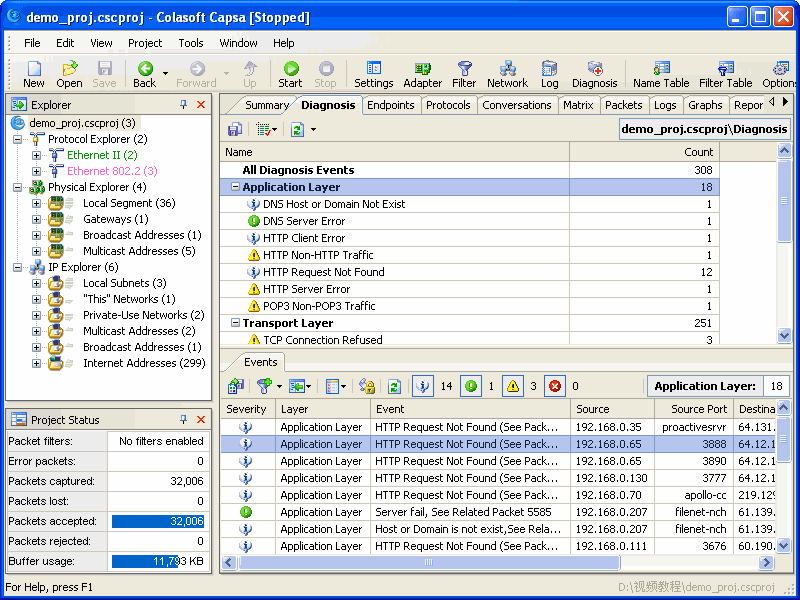
Diagnosis Tab Screenshot
If there is a host infected with an email worm, we should be able to see SMTP events in the application layer like this:
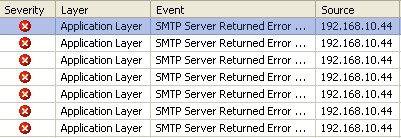
SMTP Events in Application Layer
>Step4. Locate the Source IP
Possibly the source IP is the host infected with an email worm as it is sending too many emails in a short period of time with SMTP. So let’s locate the source IP in the “Explorer” with the “Locate” shortcut in the right-click menu.
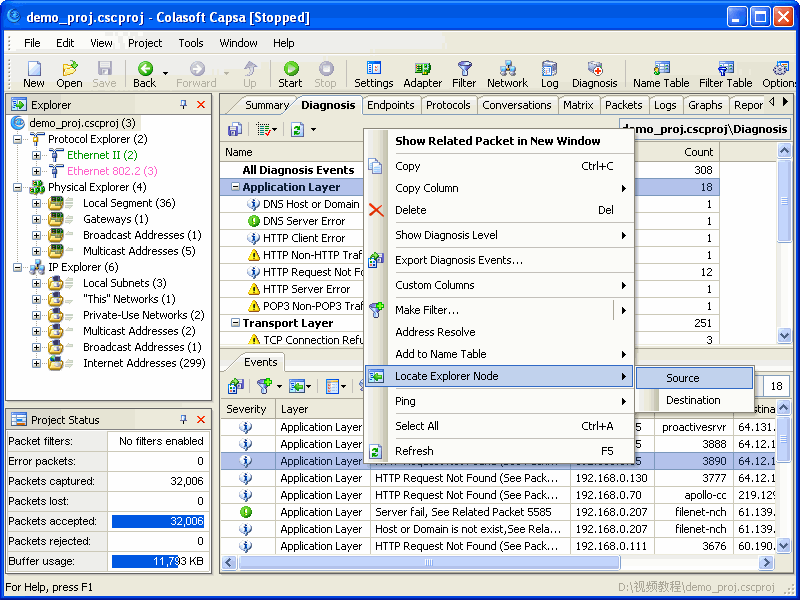
Locate Source IP
>Step5. Switch to “Logs” Tab
Check if the host is sending emails to a large number of recipients in a very short period of time. If so, we can determine the host is infected with an email worm and should be handled immediately. We should be able to see logs in the Tab like this:
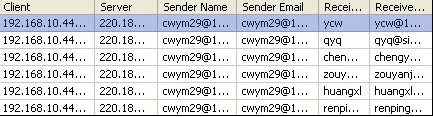
View Email Logs in "Logs" Tab
No doubt the final step is to isolate the host and kill the email worm with some AV software
Also there will be some other process to detect email worm with Colasoft Packet Sniffer, this is the shortest one.


Hi,
Onload of page my antivirus put alert, check pls.
Thank you
Tania
Oh really? Could you please send me a screenshot? Thanks a lot.
Написать пост на пол страницы время есть, а ответить нет? Нормально..
Я подписался на RSS ленту, но сообщения почему-то в виде каких-то иероглифов 🙁 Как это исправить?..
Better than a thousand hollow words, is one word that brings peace.
There is obviously a lot to know about this. There are some good points here.
Just wanted to drop you a line to say, I enjoy reading your site. I thought about starting a blog myself but don’t have the time.
Oh well maybe one day…. 🙂