How to Monitor Internet Traffic with Colasoft Packet Sniffer
Internet traffic is the flow of data around the Internet. It includes web traffic, which is the amount of that data that is related to the World Wide Web, along with the traffic from other major uses of the Internet, such as electronic mail and peer-to-peer networks.
In case we want to monitor internet traffic generated or is generating in LAN, here is a detailed process how we can monitor internet traffic with Colasoft Packet Sniffer – Capsa.
We must make sure the packet sniffer software is correctly implemented so we can capture all the traffic in LAN, if you don’t know how to do it, please make sure you read how to implement a packet sniffer.
First let’s launch a new project with Colasoft Packet Sniffer, then do some online activities, such as chatting, browsing a website, sending and receiving emails, downloading some files. All these activities will generate different kinds of internet traffic. We may keep the project running to continuously monitor internet traffic or stop the project to do some analysis.
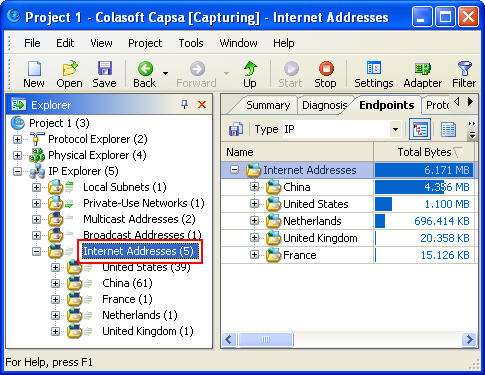
To monitor internet traffic, we’d better first select the “Internet Addresses” in the “Explorer” on the left window:
Monitor Internet Traffic Screenshot1
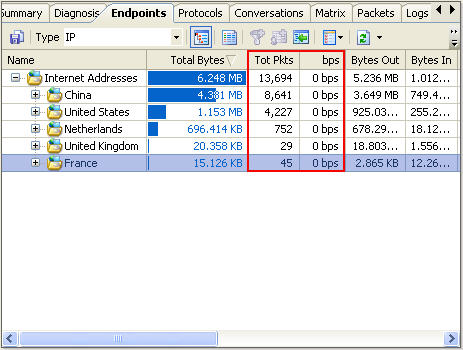
We can see that all the internet addresses are listed by countries, to monitor internet traffic of a specific country, we just need click on it; If we want to monitor internet traffic of a specific IP address within one country, we need to expand the country node and select the IP address in it.
Also we can monitor internet traffic aggregated or internet traffic in real-time
Monitor Internet Traffic Screenshot2
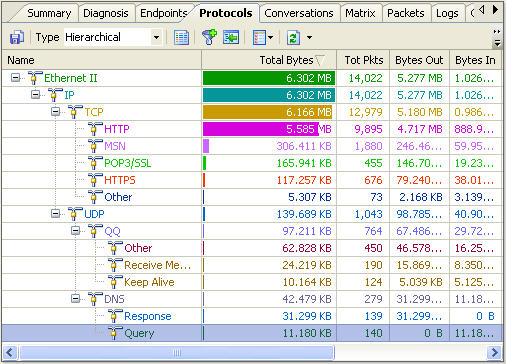
To view what online activities have generated or are generating internet traffic, we need to use the “Protocols” Tab.
Monitor Internet Traffic Screenshot1
We can see there are protocols which separately stand for different internet activities:
HTTP – Website browsing
MSN – online chatting with Live Messenger
POP3 – Email
HTTPS – Website browsing via a secure link
QQ- online chatting with QQ
DNS – Domain Name System


Großartig, dass es solche Bloggs gibt
Very interesting site. Hope it will always be alive!,
Sounds good. Go on like this.
This contribution is really good – we should follow it up in this form.
Great, that there are such blogs
Very nice site!
It is really great mini tutorial how to sniff what happen on your computer. It should be great if you have taken time to add more information’s about sniffing packets (what exactly has been sent off and received).
Maybe next time. I use long time packet sniffer from TamoSoft – CommView.
Thank you
It is really great mini tutorial how to sniff what happen on your computer. It should be great if you have taken time to add more information’s about sniffing packets. Thank you for the information that you share.
Great post,.. I’ll try this one.. Is it free?
From the picture itself its actually friendly user..
Thanks,.. Keep me updated.. Is the software still out?
There has been many versions upgraded. Now it is Capsa 7.4.1.
I am making an effort to obtain traffic for my best website for some time now. I stumbled upon your blog and nowadays i will eliminate buying web traffic and begin finding some natural organic traffic from Google search engine.
This helped me a lot. Thanks.
I didn’t know anything about this Colasoft Packet Sniffer but I will try this out since a lot of people are using it. It means that the result are reliable.